Construction projects have more moving parts than almost any other business. Sites, workers, materials, drawings, approvals, payments, and clients all need attention at the same time, and usually across more than one location. When this is managed on paper, spreadsheets, and WhatsApp groups, information gets lost, updates arrive late, and small gaps quietly turn into cost and delay.
Construction management software brings all of this into one place. Instead of chasing updates from different people and files, builders and contractors get a single, live view of every project, from the first task on site to the final bill.
This guide explains what construction management software is, the features that actually matter, how it improves day-to-day work, and how to choose the right platform in 2026.
What is construction management software?
Construction management software is a digital platform that helps builders, contractors, and developers plan, execute, and monitor projects from one system. It connects the work happening on site with the office, so tasks, progress, workforce, materials, billing, and reporting all stay in sync.
Unlike generic office tools, construction-focused software understands how projects really run, including daily site reporting, labour attendance, material issue and consumption, running bills, drawing versions, and approvals across multiple sites.
The real cost of managing construction manually
Construction remains one of the least digitised industries in the world, and the results show up in project outcomes. Research by the McKinsey Global Institute found that large construction projects typically run 20% longer than scheduled and up to 80% over budget, while construction productivity has grown only about 1% a year over the past two decades.
McKinsey estimates that closing this gap could lift industry productivity by 50–60% and add roughly $1.6 trillion in value globally each year (McKinsey Global Institute, 2017). Much of that lost time and money comes from avoidable causes — rework, miscommunication, and decisions based on out-of-date information — which is exactly what construction management software is built to reduce.
Why construction businesses need it
As soon as a business runs more than one site, or more than a handful of workers, manual methods start to break down. Information sits with individuals, updates depend on phone calls, and no one has the full picture at once.
Without a proper construction management platform, teams commonly face:
- Site progress that is only known once someone reports it
- Labour and attendance disputes with no clear record
- Material wastage and stock that does not match the books
- Delayed or incorrect billing and payments
- Drawings and documents that exist in several versions
- Owners and managers with no real-time view of their projects
A dedicated platform removes these gaps by capturing information where it happens and making it instantly available to the people who need it.
The real value of construction management software is not more reports, it is fewer surprises, because problems are visible while they are still small enough to fix.
Core features to look for
Not every tool called “construction software” covers the full project. When comparing options, look for the features that connect the site and the office:
- Project and task management with clear ownership and timelines
- Daily progress and site reporting from a mobile phone
- Workforce and labour attendance
- Material, inventory, and warehouse management
- Billing, running account bills, and payment tracking
- Document and drawing management with version control
- Real-time dashboards for owners and managers
- Role-based access so each person sees only what they should
How it improves site and office coordination
The biggest difference construction management software makes is in coordination. When a site engineer records progress, marks attendance, or issues material, that information updates the office instantly. Managers no longer wait for end-of-day calls, and owners can check any project whenever they want.
This shared, up-to-date view reduces miscommunication between departments, speeds up approvals, and helps teams act on accurate information instead of assumptions.
Manual methods vs construction management software
The difference is clearest when you compare how each part of a project is handled day to day.
| Task | Spreadsheets, paper & WhatsApp | Construction management software |
|---|---|---|
| Site progress | Known only when someone calls or reports it | Updated live from the site as work happens |
| Workforce attendance | Paper registers and disputes that are hard to verify | Digital attendance with a clear, auditable record |
| Materials & stock | Entries that rarely match what is on the store | Issue and consumption tracked against live stock |
| Billing & payments | Manual bills that are slow and error-prone | Running bills and payment tracking in one place |
| Drawings & documents | Several versions scattered across phones | A single source of truth with version control |
| Owner visibility | Depends on asking the site team for updates | Real-time dashboard across every project |
buildcontrol: one platform for the whole project
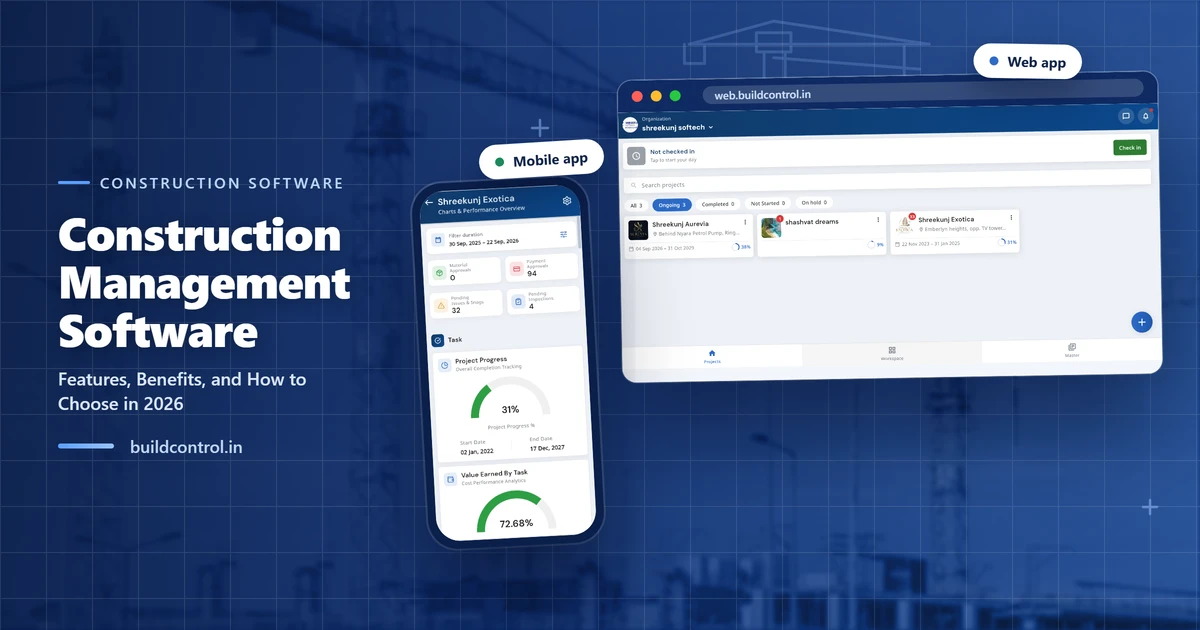
buildcontrol is built specifically for the construction industry and brings the complete project into a single platform. Instead of separate apps for each function, teams manage everything from one connected system:
- Project and task management
- Daily site reporting
- Workforce and attendance management
- Material and inventory control
- Billing and payment management
- Drawing and document management
- CRM and enquiry management
- Reports and analytics dashboards
Because these modules share the same data, work done in one area flows through to the rest, cutting duplicate entry and keeping records consistent across the business.
Built for the site: mobile, cloud, and real-time
Construction work does not happen at a desk, so the software has to work where the work is. A cloud-based, mobile-first platform lets site teams update progress, attendance, and material use directly from their phones, while owners and managers see the same information in real time from anywhere.
This matters most for businesses running multiple projects, where the ability to compare and monitor every site from one screen replaces a stack of separate reports.
How to choose the right construction management software
The best choice is the one your site teams will actually use. When evaluating platforms, check that it:
- Is built for construction, not adapted from a generic tool
- Works well on mobile and in low-network site conditions
- Is simple enough for site staff to adopt quickly
- Connects site and office instead of adding another silo
- Covers your key needs today and can scale as you grow
- Gives owners clear, real-time visibility of every project
Benefits for builders, contractors, and developers
For builders and developers, construction management software brings order to daily site operations and clearer control over cost and progress. Civil contractors gain better coordination across multiple projects and fewer disputes over labour and materials.
Developers can monitor large portfolios, track billing and cash flow, and maintain complete visibility from start to handover. Whatever the size of the business, one connected platform improves efficiency and reduces the leakage that quietly eats into margins.
Conclusion
Construction management software has moved from a nice-to-have to a practical necessity for businesses that want to stay in control of cost, time, and quality. By bringing projects, workforce, materials, billing, and reporting into one platform, buildcontrol helps builders, contractors, and developers run every site from a single, real-time view, and make decisions with confidence.
Frequently asked questions
What is construction management software?
Construction management software is a digital platform that helps builders and contractors plan, execute, and monitor projects, covering tasks, site progress, workforce, materials, billing, and reporting from one place.
What features should construction management software have?
Core features include project and task tracking, daily site reporting, workforce attendance, material and inventory control, billing and payments, document and drawing management, and real-time dashboards.
Is construction management software useful for small contractors?
Yes. Even small contractors benefit from fewer missed updates, clearer site visibility, and less paperwork. Cloud-based tools like buildcontrol scale from a single site to many projects.
Can buildcontrol manage the whole project in one platform?
Yes. buildcontrol combines project management, attendance, inventory, billing, reporting, and CRM in one integrated platform, so teams do not switch between separate apps.
How do I choose the right construction management software?
Look for construction-specific features, mobile use on site, easy adoption for site teams, real-time reporting, and one platform that connects site and office instead of separate tools.
Run your sites from the buildcontrol app
Manage attendance, tasks, materials and billing from your phone — the whole platform, on site and on the go.
See buildcontrol run your whole project
Book a short demo and see site progress, workforce, materials, and billing come together in one platform.
Book a free demo